Maximize Your Reading Life with the Digital Reading Journal Canva KDP
A well-organized reading journal can transform how you track, review, and celebrate your literary journey. The Digital Reading Journal Canva KDP offers a versatile, editable solution that works for everyone—from casual readers to prolific bibliophiles. By combining the flexibility of Canva with the ready-made structure of a KDP-ready interior, this journal allows you to record every book, analyze your habits, and set meaningful reading goals without starting from scratch.
What Makes a Digital Reading Journal Canva KDP Interior Unique?
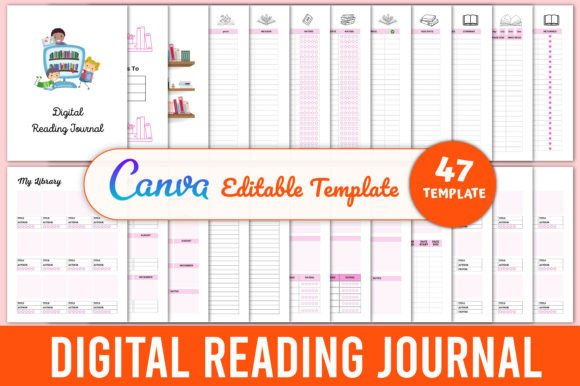
Unlike traditional printed journals, a digital journal built with Canva gives you on-the-fly edits, unlimited copies, and the ability to personalize every page. The Digital Reading Journal Canva KDP Interior includes a comprehensive set of pages that cover the full reading lifecycle: pre-reading planning, active tracking, post-reading reflection, and long-term goal setting. You receive high-quality PDF, JPEG, and PNG files that are ready to use immediately—either printed or kept digital on tablets like an iPad, Remarkable, or Android device.
The interior is designed with clean, modern layouts that prioritize usability. Every detail, from the “Belongs to” page to the “Thank You” closing, ensures that your journal feels cohesive and professional. Since it’s editable via Canva, you can adjust fonts, colors, and even page order to match your personal aesthetic or brand.
Core Components of the Journal
Below is a breakdown of the key page types included in the Digital Reading Journal Canva KDP interior. Each serves a distinct purpose and together they form an end-to-end system for managing your reading life.
Ownership and Identification Pages
- Belongs to Page – A personalization space for name, date, and contact details. Essential for printed journals given as gifts or used in shared households.
- Thank You Page – A closing page that adds a professional finish, often used in KDP interiors to thank the user for purchasing or downloading.
Library and Collection Management
- Book Shelf – A visual overview of books you own or have read, ideal for quick reference.
- My Library – A more detailed catalog that can list author, genre, and location of each book.
- Catalog – A comprehensive index that can be used for either digital or physical book inventories.
Planning and Wishlisting
- My Book Wishlist and Books Wishlist – Two slightly different layouts to capture books you want to read or acquire.
- Book To Read and To Be Read (TBR) – Dedicated spaces to prioritize your next reads.
- Book To Buy – A shopping list tailored for book purchases, especially useful for tracking price and format.
Active Reading Logs
- Reading Log – A standard entry log for date, title, pages read, and time spent.
- Monthly Reading Log (2 Unique Pages) – Two distinct monthly layouts allow you to switch between a simple list and a more detailed tracker with notes.
- Currently Reading – A dedicated page for the book you’re in the middle of, including progress bars or page counts.
- Library Book Tracker – Specifically designed for books borrowed from public or digital libraries, with due dates and renewal notes.
Status and Review Pages
- Finished Books – A list or grid of completed reads, often with ratings and completion dates.
- Book Review – A structured page to write full reviews, with sections for summary, favorite quotes, and star rating.
- Series Tracker – Keep tabs on multi-book series: books read, upcoming releases, and overall series rating.
- Series Book Review and Series Book Overview – Two complementary pages that allow you to evaluate an entire series at once.
- Did Not Finish (DNF) – A non-judgmental space to record abandoned books and reasons why.
- Abandoned Books – Similar to DNF but with more room for reflection, helping you learn your reading preferences over time.
Goal Setting and Challenges
- Yearly Reading Goals – Set an annual target, break it down by month, and track progress.
- Yearly Goals and Yearly Reflections – Two pages that bookend the year: one for planning, one for looking back with gratitude and insight.
- Monthly Reflections – A lightweight monthly check-in to review what worked and what didn’t in your reading routine.
- Book Of The Month – A spotlight page for your favorite read each month, with space for a photo or cover art.
The challenge pages are especially varied:
- Monthly Reading Challenge
- 10 Books Challenge
- 25 Books Challenge
- 30 Day Reading Challenge
- 52 Books Challenge
- 50 Books Challenge
- 100 Books Challenge
- 200 Books Challenge
Each challenge page includes a tracker (progress indicator, checkboxes, or thermometer) tailored to the numeric goal.
Author and Quote Tracking
- Favorite Author – A page to celebrate authors you love, with space for biography notes and book list.
- Favorite Quotes – Collect memorable lines from your reading, organized by book or theme.
- Favorite Books – A curated list of your all-time favorites, perfect for sharing recommendations.
Note-Taking and Summary Pages
- Reading Notes – Blank or lined pages for free-form thoughts during reading.
- Book Summary – A structured outline for summarizing a book’s key points, themes, and takeaways.
- Notes – General-purpose note pages at the end of the journal for miscellaneous ideas.
Practical Applications for Different Users
The Digital Reading Journal Canva KDP isn’t a one-size-fits-all template; its modular design lets each user emphasize the sections that matter most to them.
- Educators and Researchers can use the review and summary pages to annotate academic texts or track curriculum-related reading. The “Book Summary” and “Notes” sections are ideal for synthesizing information across multiple sources.
- Book Club Members benefit from the “Book Review” and “Series Tracker” pages, making it easy to share opinions and keep club discussions organized.
- Parents and Homeschoolers can print the journal for children to encourage reading habits. The “Monthly Reading Log” and “Books Wishlist” are engaging for young readers.
- Content Creators and Bloggers who review books can use the journal as a content planner: draft reviews in the “Book Review” page, track publication dates in “Book Release,” and collect quotes for social media posts in “Favorite Quotes.”
- Goal-Oriented Readers (challenge participants) will find the dedicated challenge pages particularly motivating. The separate pages for 10, 25, 50, 100, and 200 books allow you to scale your ambition without cluttering a single page.
Editing Workflow with Canva
One of the standout features of the Digital Reading Journal Canva KDP interior is its complete editability. You receive an editable Canva link along with the high-resolution PDF, JPEG, and PNG files. This means you can:
- Change fonts and colors to match your personal style or brand identity.
- Add or remove pages – don’t need the “Library Book Tracker”? Delete it. Want extra “Reading Notes” pages? Duplicate them.
- Insert images – place book covers, stickers, or photos directly onto the pages.
- Resize the entire journal for different print formats (A5, US letter, half-letter) while preserving the layout.
- Re-export in multiple formats – use PNG for digital stickers, JPEG for quick previews, and PDF for professional printing through KDP or other print-on-demand services.
Because the interior is built using Canva’s free account features, you don’t need any design software expertise. The learning curve is minimal, and anyone can start editing within minutes.
Considerations for Use
While the journal is remarkably comprehensive, there are a few practical points to keep in mind:
- Printing duplex: Some users prefer to print double-sided. The interior pages are designed with standard margins, but you may need to adjust the binding margin if you’re using a spiral binder or ring binder.
- Digital use on tablets: For those who want a paperless workflow, the PDF can be imported into apps like GoodNotes, Notability, or Noteshelf. The page links are not hyperlinked within the PDF (unless you add them), so navigation relies on app features like bookmarks or thumbnail view.
- Overlapping challenges: With so many challenge pages, you might find yourself duplicating entries. A best practice is to pick one primary challenge and archive the others, or use them for different reading categories (e.g., non-fiction, fiction, audiobooks).
Real-World Relevance of a Digital Reading Journal
In an age of digital distractions, a reading journal brings intentionality back to the habit. The Digital Reading Journal Canva KDP helps you see patterns: Do you start many books but never finish? Are you hopping between genres too quickly? The “Did Not Finish” and “Abandoned Books” pages provide data to refine your choices. The yearly and monthly reflections encourage you to celebrate wins and adjust strategies.
For creators and sellers on KDP, this interior is a plug-and-play product. You can use it as a low-content book, add your own cover, and publish it on Amazon. The editable Canva link makes it easy to update the interior if you want to offer multiple versions (e.g., with different color themes or added pages).
Summary of Included Files
When you acquire this Digital Reading Journal Canva KDP Interior, you typically receive:
- Editable Canva template link
- High-resolution PDF (print-ready)
- JPEG images of each page
- PNG images with transparent backgrounds for certain elements
- A bonus “Thank You” page and sometimes extra cover templates
All files are designed to be used immediately—no additional fonts or assets needed, though you can always customize further.
Whether you are a seasoned reader looking to systematize your hobby, a teacher cultivating literacy, or a KDP publisher wanting a ready-made interior, the Digital Reading Journal Canva KDP offers a flexible, high-quality foundation. Its extensive page range ensures that no aspect of your reading journey goes unrecorded. By leveraging the simplicity of Canva’s editing environment, you can tailor the journal precisely to your needs and produce a polished final product that you’ll use for years to come.