Editable 2024 Planner Canva KDP
If you have ever tried to build a planner from scratch, you know how quickly small decisions add up. Fonts, spacing, layout, margin bleeds, and page numbering can eat hours. The Editable 2024 Planner Canva KDP skips all that guesswork. It arrives as a complete, print-ready interior package that has already passed Kindle Direct Publishing checks, so you can focus on what actually matters: creating something useful for your audience or for your own workflow.
This is not a single PDF with a few calendar pages tacked on. It is a full ecosystem of planning tools, from daily and weekly spreads to financial trackers, vision boards, study planners, and password logs. Every template is editable through Canva, meaning you can adjust colors, swap fonts, add your own branding, or remove sections without touching design software like InDesign or Illustrator. For anyone running a shop, building a brand, or simply wanting a tailored 2024 planner, that flexibility is the difference between a generic product and one that feels intentional.
What the Editable 2024 Planner Actually Includes
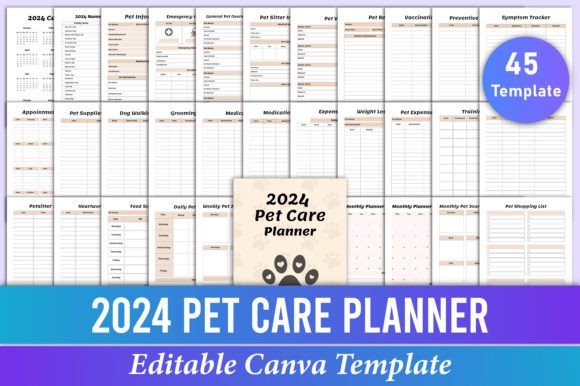
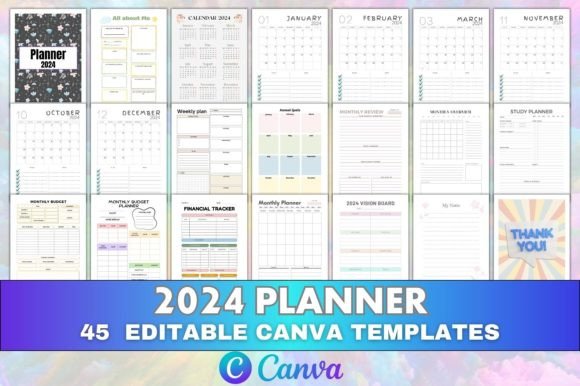
The set covers 45 editable Canva templates. That number might sound high until you scan the full list: an intro page, an all-about-me spread, a 2024 calendar, twelve monthly planners from January to December, annual goals, important dates, a daily planner, weekly plan, year at a glance, yearly events, contact list, passwords, to-do list, birthdays, monthly review, monthly overview, annual overview, books to read, study planner, monthly planner, monthly budget, financial tracker, annual finance, monthly budget planner, monthly goals, budget overview, monthly income tracker, monthly expense tracker, monthly fitness, vision planner, 2024 vision board, daily organization, and a thank-you page.
Each template is a separate Canva file, which is worth emphasizing. You are not fighting with a single massive document where moving one element misaligns everything else. You work on individual pages, export them as high-quality PDFs, and upload them to KDP without reformatting. The ready-to-upload PDF files are also included, so even if you never open Canva, you have a print-ready interior ready to go.
Visual Style and Design Personality
The planner leans toward clean, modern typography with generous white space. This is not a dense, scrapbook-style journal where every inch is filled with decorative elements. Instead, it uses clear headers, simple tables, and uncluttered line layouts that work whether you print in black and white or full color. The design personality is professional but approachable: organized enough for a small business owner tracking quarterly revenue, relaxed enough for a hobbyist mapping out reading goals or fitness habits.
Headers function as display elements that establish visual hierarchy quickly. You can glance at a page and know immediately whether you are looking at a monthly overview or an expense tracker. The body text, used for labels and prompts, reads as a clean sans serif that does not compete with your handwriting. That balance matters more than most people realize. A planner that looks beautiful empty but feels cramped once you start writing is not actually useful. This one leaves room for real use.
Where the Planner Works Best
The audience for this kind of resource is broader than you might expect. Here are the most natural fits:
- Small business owners and entrepreneurs who need to track income, expenses, monthly goals, and annual finance in one place. The budget and financial tracker sections eliminate the need for a separate accounting notebook.
- Freelancers and creators juggling multiple projects, clients, and deadlines. The weekly plan and daily organization pages become the central hub for task management.
- Students and lifelong learners who want a study planner alongside calendar and goal pages. The books-to-read tracker and vision board add motivation beyond just assignments.
- Bloggers, content creators, and publishers testing KDP as a revenue stream. Because the interior is already formatted and checked, you can publish a low-content or medium-content planner quickly, then adjust the Canva link to create variations for different niches.
- Anyone managing a household with multiple schedules, budgets, and important dates. The password log, contact list, birthdays, and monthly overview sections reduce mental clutter.
In every case, the editable nature of the files means you are not locked into someone else's aesthetic. You can match the planner to your brand colors, add your logo, or simplify sections that do not apply. That is the difference between buying a planner and building your own system.
How It Influences Readability and Daily Use
Readability in a planner is not just about font size. It is about visual rhythm. When every page follows a consistent structure, your brain learns where to look. The Editable 2024 Planner Canva KDP achieves this through repeated header placement, uniform table layouts, and predictable spacing. You do not waste mental energy figuring out how a page works each time you flip to it.
The brand identity you build with this planner, whether personal or commercial, also benefits from consistency. If you use the same color palette, header style, and layout across all your planning pages, users (or you) develop a sense of familiarity. That leads to higher engagement with the content. Someone who finds your planner easy to use is more likely to stick with it through the year, and for KDP publishers, that translates to better reviews and repeat buyers.
Professionalism also comes through in the details. The print-ready PDFs include proper trim marks, bleed, and page sizes that match KDP specifications. That might seem like a technical footnote, but it is the difference between a listing that looks polished and one that gets rejection notices from Amazon. Every template has been checked for these requirements, removing a common friction point for new publishers.
Practical Guidance for Customization and Use
If you are new to Canva, the editable link might feel like a lot of options. Here is a straightforward approach:
- Open the master Canva link and browse all 45 templates. Do not edit anything yet. Just scroll through to understand the full scope. Note which sections you would use personally and which ones feel irrelevant for your project.
- Remove or hide sections you do not need. If you are selling a fitness-focused planner, keep the fitness tracker, monthly goals, vision board, and calendar. Delete the budget and finance pages. If you are making a personal planner, keep everything and just adjust the colors.
- Choose a consistent color palette. Stick to two or three colors maximum. Use the strongest color for headers and accents, a neutral for backgrounds, and a dark shade for body text. This keeps the planner looking intentional rather than chaotic.
- Test font pairings. The default fonts work fine, but if you want a specific brand feel, swap header fonts for a serif or a modern sans serif that matches your identity. Keep body fonts simple and legible at small sizes. Avoid script fonts for anything below 10 point text.
- Export as print-ready PDFs. Canva lets you download as PDF Print format, which preserves bleed and crop marks. Upload those directly to KDP. Keep the editable Canva link handy in case you need to make adjustments after a test print.
For publishers, one smart strategy is to create multiple variations from the same source files. One version might focus on budget and finance, another on fitness and vision planning, and a third as a full all-in-one planner. Because you already have the base templates, each variation takes an afternoon rather than weeks of design work.
Real-World Value Beyond the Templates
The deeper value here is not the PDFs themselves. It is the structure. A blank notebook gives you freedom, but it also gives you friction. Every time you start a new page, you have to decide where to put dates, how to lay out tasks, and what format to use. That friction adds up over a year. With a pre-built system, you remove that decision fatigue. You open the page, and the framework is already there. You just fill it in.
That is why the Editable 2024 Planner Canva KDP works for both personal and commercial use. It reduces the overhead of planning itself, letting you focus on the actual tasks, goals, and habits you want to track. And because you can edit the files, the system never feels rigid. If you realize in March that you need a different layout for your weekly plan, you can change it. You are not stuck with a printed book you cannot modify.
For designers and creative professionals, this also functions as a design asset library. The page layouts, table structures, and organizational frameworks can be repurposed for other projects. Need a budget tracker for a client's online course? Start from the template. Building a productivity journal for a different year? Modify the headers and dates. The templates become building blocks, not just a one-time product.
The same applies to small business owners. If you sell digital products, you can use the planner as a lead magnet, a upsell, or a bundled offering. The print-ready files give you a tangible product, while the editable Canva link gives you the freedom to iterate. That combination is rare in most KDP resources, which usually offer one or the other.
Making the Choice That Fits Your Workflow
Before you download or purchase, take a honest look at how you actually plan. Do you prefer weekly spreads over daily pages? Do you need financial tracking or is that a distraction? Are you publishing for profit or organizing your own life? The answer will tell you which templates to emphasize and which to skip.
For publishers, the best approach is to start with the full set, publish one version as a comprehensive planner, and then create niche versions over time. Each variation builds your KDP catalog with minimal additional design work. For personal users, customize the colors and sections, print a test copy, and adjust as you go. The editable link makes iteration painless.
Either way, the foundation is already tested and ready. The formatting, the KDP compliance, and the variety of templates are all in place. What remains is your own input: the colors you choose, the sections you prioritize, and the way you use the planner day to day. That is where the real value shows up, and it is why editable resources consistently outperform rigid pre-made products.