Crafting a Top Seller: Bullet Journal KDP Interiors
If you sell low-content books on Amazon, you know the real challenge isn’t dreaming up niche ideas—it’s executing them quickly, consistently, and without technical hiccups. A well-designed Bullet Journal KDP Editable Interior removes the steepest obstacles. It gives you a professional-grade layout system that you can customize, brand, and scale. Instead of rebuilding every spread from scratch, you start with a framework that already works. That changes your workflow from tedious assembly to focused creative direction.
The Anatomy of a Practical Design System
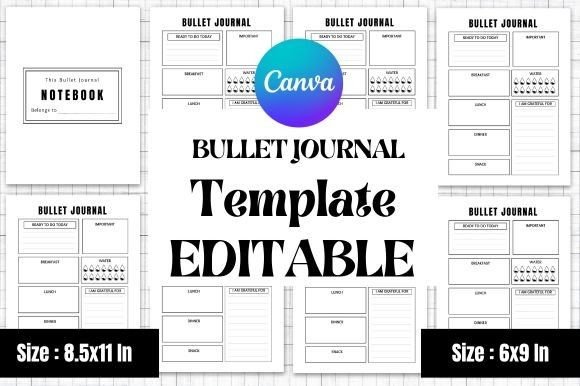
A great bullet journal interior is more than a collection of dot grids and blank pages. It’s a modular design system. The template provides a consistent visual hierarchy, balanced white space, and logical flow from monthly calendars to weekly logs and daily trackers. This particular Bullet Journal KDP Editable Interior acts like a versatile typeface family—it offers consistent structural “weights” (like full-page spreads, half-page trackers, and compact habit wheels) that work together seamlessly.
Visually, the template leans into clean, approachable modern typography and layout principles. It doesn’t shout for attention. Instead, it creates a calm, spacious canvas that invites the user to write, draw, and plan. This restrained personality is a strategic advantage on KDP. Buyers looking for productivity tools or creative outlets gravitate toward interiors that feel intentional and uncluttered. The template’s grid is rigid enough to provide reliable scaffolding, yet flexible enough to host a wide variety of content—from minimalist mood trackers to detailed budget ledgers.
Why This Matters for Brand Perception
When a customer flips through your book on Amazon’s “Look Inside” feature, the layout is the first thing they judge. A messy or inconsistent interior screams amateur. A polished, thoughtfully structured interior signals trust and professionalism. Using a premium layout system like this helps you build a strong, recognizable brand identity across your entire catalog. Consistency from one journal to the next trains buyers to recognize your work, which leads to repeat purchases and higher engagement.
Where This Template Delivers the Most Value
This is not a one-size-fits-all product that actually only fits one scenario. The two included sizes—8.5×11 inches and 6×9 inches—open up distinct market opportunities. The 8.5×11 size is ideal for comprehensive workbooks, teacher planners, and detailed habit trackers. It gives you room to include large tables, extended weekly spreads, and plenty of note space. The 6×9 size feels more intimate and portable. It’s the perfect format for gratitude journals, reading logs, or minimalist productivity notebooks.
Because the template is 100% editable in Canva, you can adapt it for multiple formats without learning complex software. Use it for:
- Amazon KDP low-content books (pre-formatted, tested, and ready to upload)
- Printable digital planners sold on Etsy or Gumroad
- Client projects like custom wedding planners or business binders
- Social media content and lead magnets that showcase your expertise
This versatility means you invest once in the design assets and deploy them across multiple revenue streams. Entrepreneurs, content creators, and small business owners will find that the template pays for itself quickly when applied to several projects.
Practical Guidance for Choosing and Optimizing Your Template
Before you start customizing, step back and define the end user. A Bullet Journal KDP Editable Interior aimed at busy executives needs clean lines, clear hierarchy, and minimal decoration. A journal for creatives or hobbyists can embrace handwritten script fonts, playful icons, and softer color palettes. The template gives you the structural foundation. Your job is to layer on the right branding elements.
Font Pairing and Visual Hierarchy
Think of the template as the skeleton. The fonts you choose are the skin and personality. For headers, a bold, approachable sans serif pairs well with a clean body font for notes. If you’re designing a creative planner, mix in a handwritten script for accent headings. The template’s generous white space lets these typographic choices breathe. Avoid crowding the grid. Trust the layout to guide the reader’s eye naturally from section to section.
Testing and Technical Readiness
One of the strongest selling points of this template is that it is KDP tested. That means margins, bleed, and spine alignment have already been validated. This saves hours of reformatting and prevents costly printing errors. When you edit in Canva, double-check that your custom fonts are embedded correctly and that your colors are set to CMYK if you plan to print. For digital products, RGB is fine. The template’s high-quality base makes these adjustments straightforward rather than frustrating.
Commercial Licensing and Scalability
Because this is an editable template, you own the final output. That is critical for building a sustainable brand identity on Amazon or any other marketplace. You are not renting a design; you are acquiring a system. This gives you full commercial rights to sell the finished books or printables. As you scale, you can create variations of the same base layout—different color schemes, different cover styles, different niche angles—without starting from zero each time.
Real-World Recommendations for Maximum Impact
If you’re new to KDP, start with the 6×9 size. It’s one of the most popular formats on Amazon, and it works well for both fiction-adjacent low content (reading journals, gratitude diaries) and structured planners. The smaller page size forces you to be intentional with your layout, which often produces a cleaner, more focused user experience.
For more complex projects—like a teacher planner with grading sheets or a fitness tracker with extensive logging space—use the 8.5×11 version. The larger grid accommodates more data without feeling cramped. This is especially important for workbooks where the user needs to write inside small boxes. The template handles dense information gracefully because its grid system was designed with real usability in mind.
Another observation: don’t underestimate the power of a well-placed index or key page. Many bullet journal templates treat these as afterthoughts. This interior gives them proper space and hierarchy, which improves the user’s overall experience. When customers feel that a journal is easy to navigate, they leave better reviews and come back for more.
Whether you are launching your first product as a hobbyist or scaling a library of publications as a full-time KDP seller, this Bullet Journal KDP Editable Interior gives you the tools to work faster and smarter. It respects your creative time, eliminates technical guesswork, and delivers a professional result that resonates with buyers. Focus your energy on branding and marketing, and let the template handle the heavy lifting of layout and structure.